Designing a Product So AI Agents Can Use It: The Building Blocks
How we made our product usable by AI agents, part by part: more than 80 typed tools, structured output, deep search, resources, triggers, and full parity.
Summarize with:
Introduction
Most products were built for people to click through, not for an AI agent to operate. So when you point an agent at one, it has to guess. We took a different path and built our product so an agent can use it on purpose, with the same actions a person has.
The way we did that is the Model Context Protocol, or MCP. MCP is a shared standard for how an AI agent talks to an outside system. It is the common language that lets an agent ask what it can do, then do it, without us writing custom glue for every agent. I wrote a fuller explanation of the standard in the MCP deep dive. This post is about what we built on top of it, one building block at a time.
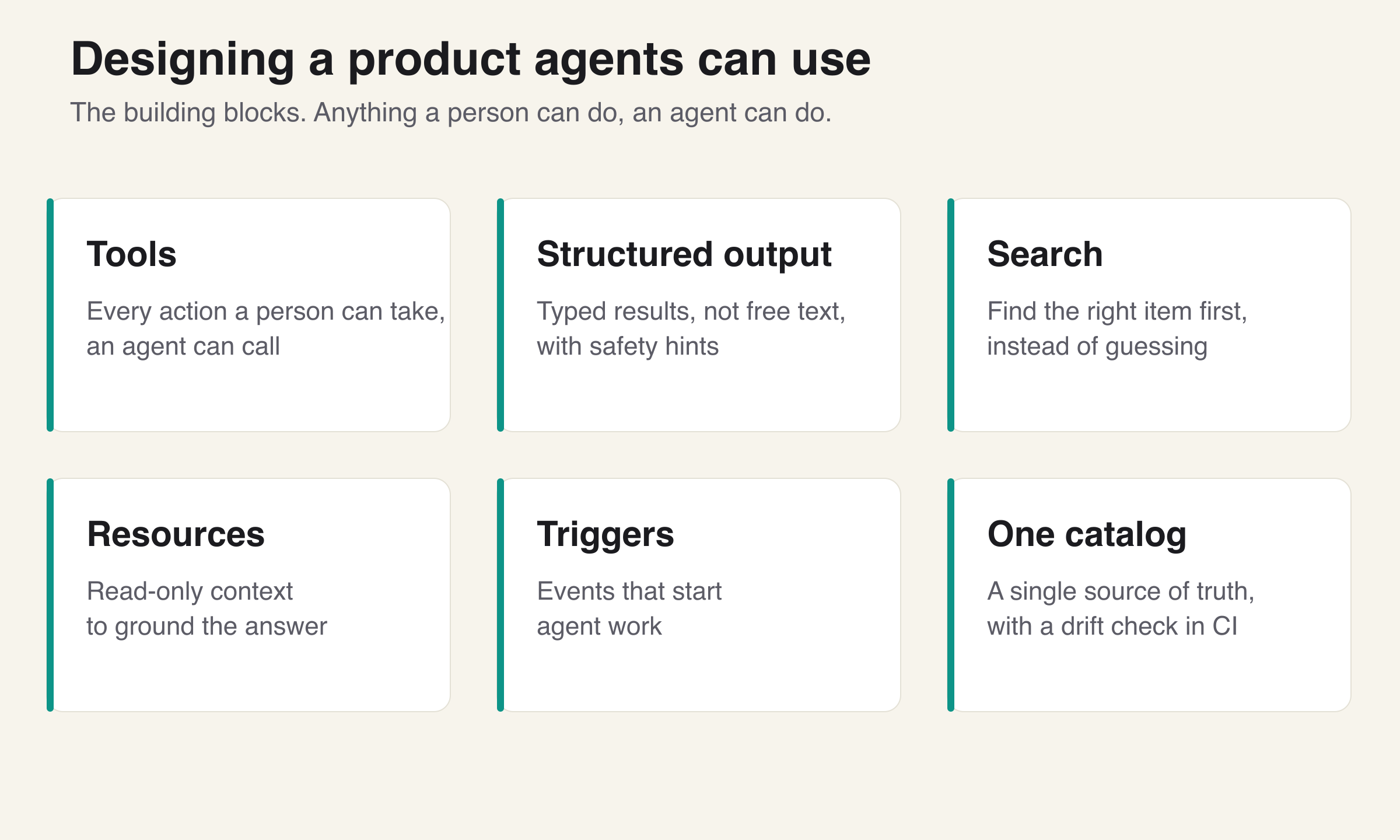
We built a server that exposes the product to AI agents through more than 80 typed tools. They cover the real product surface: media and upload, transcripts and AI insights, folders and views, recorders and surveys, chat prompts, custom fields, clips, embeds, exports, automations, and webhooks. Below is each part, and why it matters.
What you'll learn:
- What a tool is in agent terms, and why each one mirrors a real product action
- Why every tool returns structured output instead of free text, with safety hints
- How a dedicated search tool stops the agent from guessing
- What resources and triggers add beyond actions
- How we keep the whole thing in sync, and the one principle that ties it together
Tools: the actions an agent can take
A tool is an action an agent can call. That is the whole idea. Each tool is one thing the agent can do, and it maps to the same thing a person can do in the app. If a person can upload a file, search their library, create a folder, make a clip, or set up an automation, there is a tool for each of those.
We expose more than 80 of them, and they span the actual product, not a thin demo slice. There are tools for media and upload, for reading transcripts and AI insights, for folders and views, for recorders and surveys, for chat prompts, for custom fields, for clips, for embeds, for exports, for automations, and for webhooks.
The reason this matters is simple. An agent is only as capable as the actions you give it. A chat box that can answer questions about your data but cannot act on it can only describe the work, not do it. By giving the agent the same set of actions a person has, we let it actually do the work.
Key takeaway: a tool is an action, and the full set of tools is everything the agent can actually do. Give it the real actions or it can only talk.
Structured output: typed in, typed out, with safety hints
This is the part that makes the tools trustworthy. Every tool has a typed input schema and returns a typed, structured result. Typed input means the tool states exactly what it needs, so the agent fills in the right fields instead of hoping. Structured output means the tool returns a clean, predictable result the agent can read field by field, not a paragraph of text it has to parse and might misread.
Free text is where agents go wrong. If a tool answers with a sentence, the agent has to interpret that sentence, and interpretation is where mistakes creep in. A typed result removes the guessing. The agent knows the shape of what comes back before it ever calls the tool.
On top of that, every tool carries safety hints. Each one says whether it is read-only, whether it changes data, and whether calling it twice has the same effect as calling it once. That last property is what people mean by idempotent, which means an action that is safe to repeat. With these hints the agent can reason about what is safe to call before it calls it. It can tell the difference between reading your library and deleting from it, and treat them differently.
Key takeaway: typed input and typed output remove guessing, and safety hints let the agent reason about risk before it acts.
Search: find the right thing before acting
An agent that can act still needs to know what to act on. So we built a dedicated deep search tool that runs over transcripts, insights, and metadata, with filters and date scoping.
This sounds small and it is not. Without search, an agent trying to find the right recording or the right insight has to list everything and guess, which is slow and error-prone. With a real search tool, the agent finds the exact item first, then acts on it. The filters and date scoping let it narrow down the way a person would, for example to one project in one time window.
The pattern is find first, then act. Search is what makes the actions land on the right target instead of a guess.
Key takeaway: give the agent a real search tool so it locates the right item before it acts, instead of guessing from a list.
Resources: read-only context the agent can pull in
Tools are for doing. Resources are for knowing. Beyond actions, the server exposes read-only resources that the agent can pull in as grounding context: the media library, folders, the supported languages, and the transcript and insights for a given item.
A resource is reference material the agent reads to ground itself, not an action it takes. The difference matters because grounding an agent in real, current data is how you stop it from making things up. When the agent can pull in the actual library and the actual transcript for an item, its answers and its actions are based on what is really there, not on a guess about what might be there.
Key takeaway: tools are for doing, resources are for knowing, and grounding the agent in real data is how you keep it honest.
Triggers: let the product start the work
So far the agent acts when asked. But a lot of useful work should start on its own when something happens. That is what triggers are for.
A trigger is an event that starts agent work without a person asking. The product can fire these through webhooks, which are messages the product sends out the moment something happens. We ship a typed catalog of events, so the agent knows exactly what each one means and what data comes with it. The events cover real moments in the product, for example when a piece of media finishes processing, when it has been analyzed, when a recorder receives a new recording, and when a meeting's status changes.
This turns the agent from something you summon into something that responds. When a new recording lands, work can start right away. The typed catalog is what makes this reliable. The agent is not parsing a vague notification, it is reacting to a known event with a known shape.
Key takeaway: triggers let the product start the work, so the agent reacts to real events instead of waiting to be called.
Keeping it in sync, and the principle behind all of it
A set of tools this size will drift unless something holds it together. What holds it together is a single catalog that is the one source of truth for every tool. And we have a test in our build pipeline that blocks a release if that catalog ever drifts from the tools that are actually registered. So the documented surface and the real surface cannot fall out of step, because a release will not go out if they do.
That brings me to the strongest point, and the one I would lead with if I could only say one thing. The same tool catalog powers both outside AI agents and the in-app assistant, and the tools wrap the same API the product's own app uses. There is no separate, weaker agent path added on the side. The agent and the app use the exact same path.
The result is a clean rule. Anything a person can do, an agent can do. That is what people mean by agent-native, and it is a design decision, not an accident. If you want the wider architecture this sits inside, I covered it in production-ready AI agent architecture, and the team setup that built it is in from prompts to an AI engineering team.
Key takeaway: one catalog, guarded by a test, powering both the agent and the app through the same API. That parity is the whole point.
Conclusion
Making a product usable by an agent is not one feature. It is a set of building blocks: real actions, typed results with safety hints, search to find the target, resources for grounding, and triggers to start the work. The thing that makes them add up is parity. When the agent uses the same actions and the same API as the app, you stop maintaining two products and you give the agent the full surface a person has. That is the difference between an agent that can talk about your product and one that can run it.
Frequently Asked Questions
Further Reading
Tags
Related Articles
Try Our Free Tools
AI Video Prompt Generator
Generate production-ready AI video prompts through conversation. Optimized for Sora 2 and Gemini video generation
AI Video Analyzer
Analyze video content frame-by-frame with AI. Content moderation, security monitoring, accessibility, and product demos
Text Language Detector & Translator
Detect any language and translate text instantly with browser-based AI