How We Built AI Chat: From a Prompt Box to an Agent
The engineering story of our AI chat, from a single-file prompt in December 2022 to embeddings, retrieval, filters, a vector-store move, and tools.
Summarize with:
Introduction
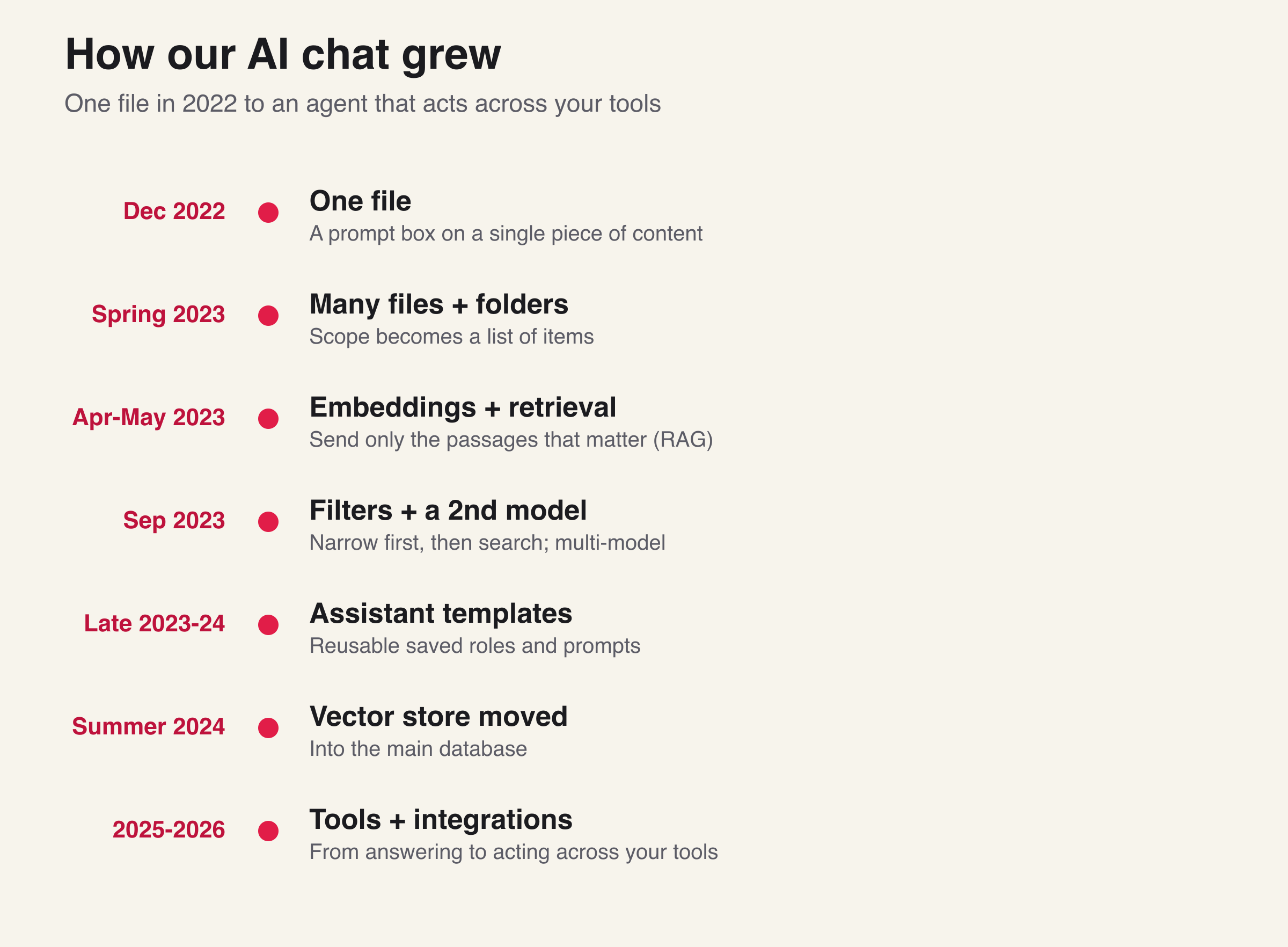
We shipped our first AI chat feature around the middle of December 2022, about two weeks after ChatGPT launched. It was small, and it only worked on one file, but it was real, and everything since then has been a steady answer to the same question. How do you let someone have a useful conversation with their own content as it grows from one file into a whole library?
This is the engineering story of that journey, with the real dates. I am writing it from our own commit history, so the timeline is honest. Each step solved the problem the last step created, and that is the part worth reading.
What you'll learn:
- How an AI chat feature actually grows, from one file to a whole library
- Why embeddings and retrieval become necessary the moment scope grows
- Why filters matter as much as the model once the library is large
- How the same feature turned from answering questions into taking actions
It started with one file, December 2022
We wired in the language model around December 15, 2022. About a week later, on roughly December 22, we shipped a prompt box on a single piece of content, and the day after that we let people write their own prompts instead of only picking ours.
The engineering here was simple, which is the point. You take one piece of content, you put it in the prompt with the question, and you send it to the model. There is nothing to retrieve and nothing to rank. One file fits. This is where almost every AI feature starts, and it works right up until someone wants to ask about more than one thing.
Then many files, and folders, spring 2023
By late March 2023 people wanted to ask across more than one recording, so we added multi-file selection and folder-level prompting within about a week of each other. Instead of one file, the request now carried a set of files, and we kept the conversation history tied to those files so a follow-up question still knew what it was about.
The design decision that made this last was small and boring. It also mattered a lot. Whatever you pick gets turned into a plain list of items before we do anything else. One file is a list of one. A folder becomes the list of every file inside it. Tags narrow that list further. From there, one file and a whole folder run through the exact same code, and the only thing that changes is how long the list is. Years later, that same idea still holds the feature together.
This is also the first real scaling problem. Two or three files still fit in a prompt. A folder with fifty recordings does not, because the model has a limit and the cost climbs with every token. So the question changed from how do I send the content to how do I send only the content that matters for this question.
The answer was embeddings and retrieval, April and May 2023
In early April 2023 we started creating embeddings. An embedding turns a piece of text into a list of numbers that captures its meaning, so two passages about the same idea sit near each other even if they use different words. We split each transcript into short pieces, tagged each piece with who said it and when, turned each into a vector, and stored them in a dedicated vector database, Pinecone at the time.
Then in early May 2023 we added vector search. Before answering a question, we embed the question, find the stored pieces whose meaning is closest to it, and put only those in front of the model. We search only the vectors for the items in your list, so the scope you picked becomes a hard filter on the search. And because every piece still carries who said it and when, we can show the matched passages back to you as references that jump to the exact moment in the recording.
This is retrieval-augmented generation. We were doing it in the first half of 2023, well before we, or most people, were calling it RAG. The word "RAG" did not even show up in our own commit messages until 2026. If you want the deeper version of how this works, I wrote a full guide on beating LLM hallucinations with RAG.
Retrieval is what makes "chat with your whole library" possible at all, because you are never sending the whole library, only the small part that answers the question.
More than one model, from early on
We added a second model provider, Anthropic, by September 2023, only months in. That early decision shaped the architecture. Today the chat runs on one loop that sits behind several model providers, so we can pick the right model for a job without rewriting the chat around it. Building that layer early meant we were never locked to one vendor's pace.
Filters, so it works when the library is large, late 2023 onward
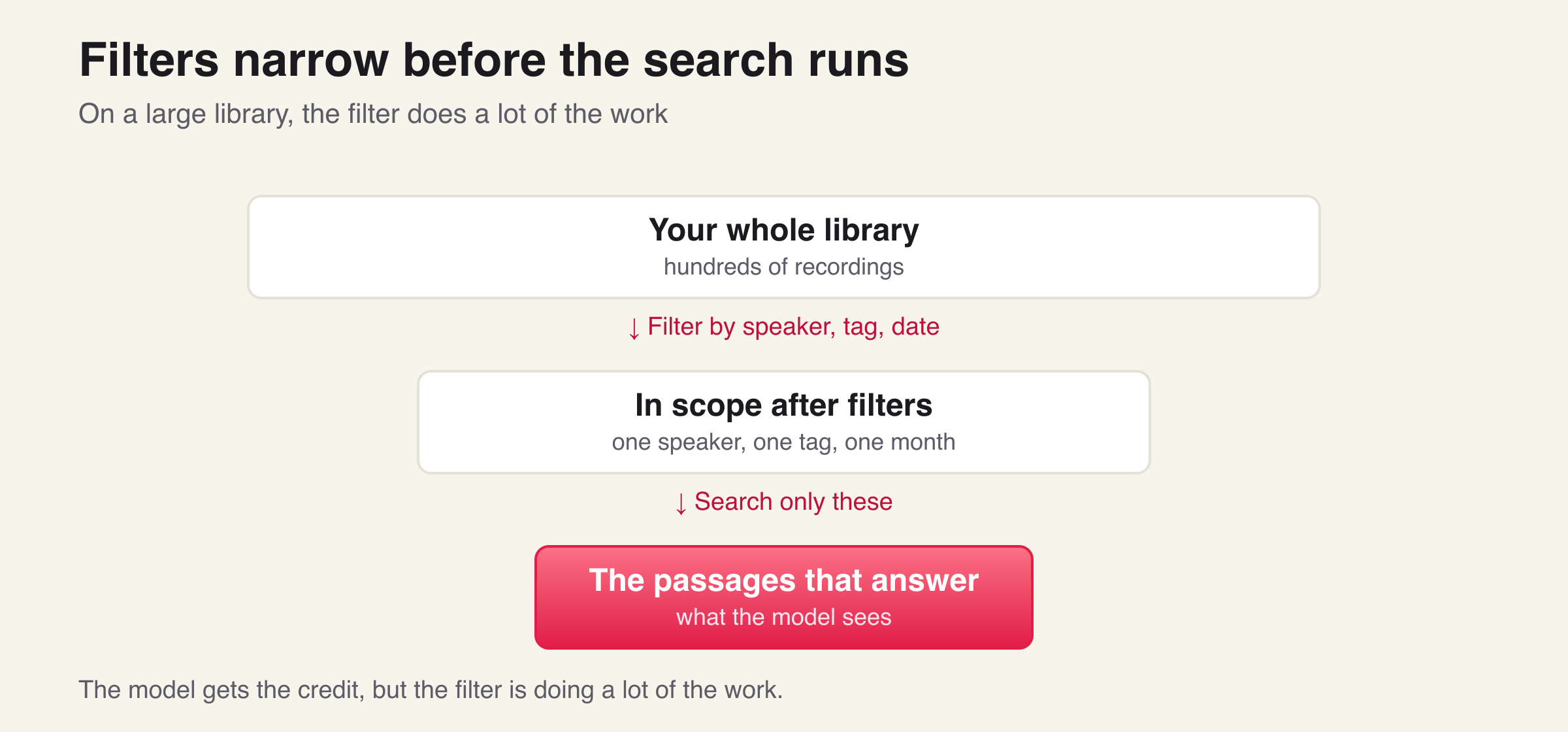
Retrieval finds the closest passages, but on a large library "closest" is not always "right." If you have hundreds of recordings, you often already know you only care about one speaker, or one tag, or one month. So around early September 2023 we added filtering by speaker and by tags to the prompt flow, and we kept deepening it, with advanced chat filters arriving around September 2025.
The engineering point is that the filter runs before and during the search, not after it. The filter first collapses the library to a small set of items with a cheap, indexed lookup, and only those items' vectors are scored. On a large library this is what keeps the answer both correct and fast, because you are searching far less. People underrate this. The model gets the credit, but the filter is doing a lot of the work.
Moving the vector store, summer 2024
Around June 2024 we began moving our vector search from Pinecone into MongoDB, and we finished by late July, with the old path switched off by mid-August. We kept a switch during the move so we could run either engine while we migrated, then turned the old one off. After the move, the vectors live alongside the rest of the data instead of in a separate service. If you are choosing where to keep vectors, I went through the tradeoffs in choosing a vector database.
Reusable assistants, 2023 into 2024
In parallel, people did not want to rewrite the same prompt every time. So in September 2023 we added assistant templates, a saved role and prompt you can reuse, and by February 2024 you could create your own. This is a small feature with a big effect, because it turns a one-off prompt into something repeatable.
A real conversation, and chatting across everything
The multi-turn chat interface, the back-and-forth conversation rather than a single prompt and answer, arrived around October 2023. To keep a long conversation fast and on topic, the assistant carries only the last several turns, not the entire history.
Chatting across many items as one conversation came later and in stages. The backend gained a queue for folder-level and multiple-media prompting around September 2025, and the chat interface gained folder options and mode control in early 2026. The honest version is that "ask across the whole library" meant search-scoped prompting in 2023, and only became a true multi-folder conversation in late 2025 into 2026.
From answering to doing, 2025 into 2026
The most recent shift is the biggest. Through late 2025 we added tool calling, so the assistant can do things, not only answer. By January 2026 it had a tool loop and could compare media, and through 2026 the product's own actions became available inside chat, so the assistant can act on your library the same way you would. It can create, update, export, and make a clip, all from a question. Because some of those actions change your data, the assistant runs its tools in a bounded loop and asks you to confirm before anything destructive.
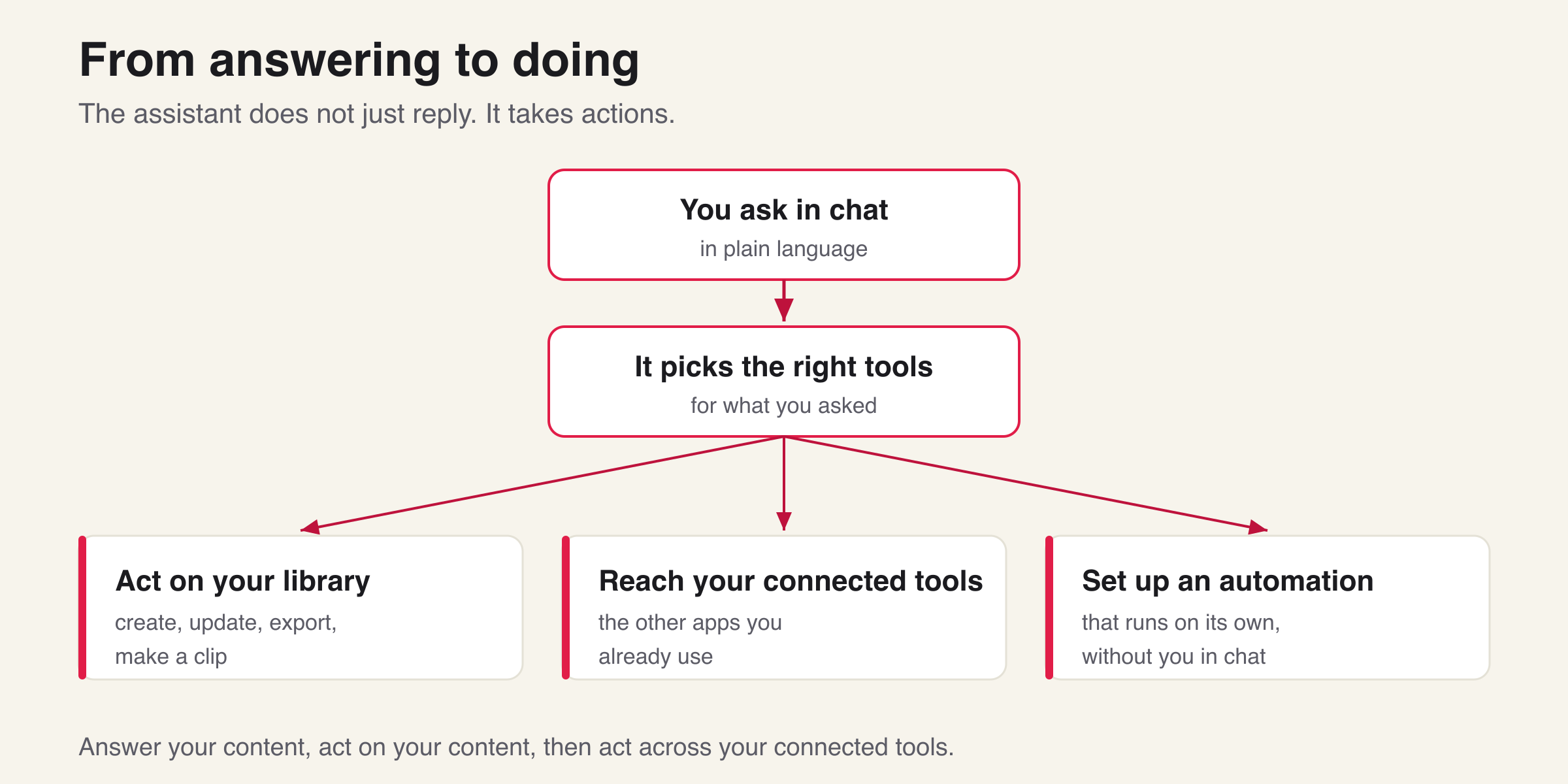
It does not stop at single actions. The assistant can also set up an automation, a small workflow that runs on its own after you have asked for it once, so a repeated task does not need you back in the chat each time. And it can reach beyond our product. We added integrations directly in the chat, so the assistant can act across the other tools you already use. You connect a tool once through a normal sign-in, and from then on the assistant can pull in that tool's actions when a question needs them, instead of being limited to what lives inside our product.
So the assistant moved through three stages: answering questions about your content, then acting on your content, then acting across your connected tools and running workflows on its own. This is the same arc I described for my own coding setup, where the tool went from answering to doing. I wrote about that in from prompts to an AI engineering team.
Alongside all of this we added the in-app features people actually use: @ to pull a specific file or folder into the conversation, and attachments so you can bring a file, an image, or audio and video straight into the chat.
The throughline
Read the dates together and the engineering story is clear. Every step was a response to scope growing. One file is easy. Many files force you to choose what to send, which forces embeddings and retrieval. A large library forces filters. A growing system forces you to move the vector store to where the data already lives. And once retrieval is solid, the natural next step is to let the assistant act, not just answer.
We started this in December 2022 and we are still building it. The interesting part was never the model. It was keeping the right context in front of the model as the amount of content kept growing.
Frequently Asked Questions
Further Reading
Tags
Related Articles
Try Our Free Tools
AI Video Prompt Generator
Generate production-ready AI video prompts through conversation. Optimized for Sora 2 and Gemini video generation
AI Video Analyzer
Analyze video content frame-by-frame with AI. Content moderation, security monitoring, accessibility, and product demos
Text Language Detector & Translator
Detect any language and translate text instantly with browser-based AI